
Discover the pros and cons of using Apple Pencil tip covers – evaluate tip protection, precision, and value with easy advice and real-user insights.
I’ve been writing and sketching on my iPad daily, and I tried using tip covers to improve the feel and protect my Apple Pencil, especially since I use Paperlike on my iPad, which offers great texture but wears the tip down more quickly. Here’s what I learned about whether Apple Pencil tip protection is worth it or not.
I love the extra friction and reduced noise, but I also noticed trade-offs in precision and durability. If you’ve ever wondered, “Is it worth using an Apple Pencil nib cover?” or “Should you use an Apple Pencil tip cover?”, this article lays it all out clearly.
CONTENTS:
Pros and Cons of Using Apple Pencil Tip Covers
Before deciding whether tip covers are right for you, it helps to understand what they actually offer, and what they might take away. Like most accessories, they come with both benefits and trade-offs depending on how you use your Apple Pencil.
Pros
-
Better grip and friction
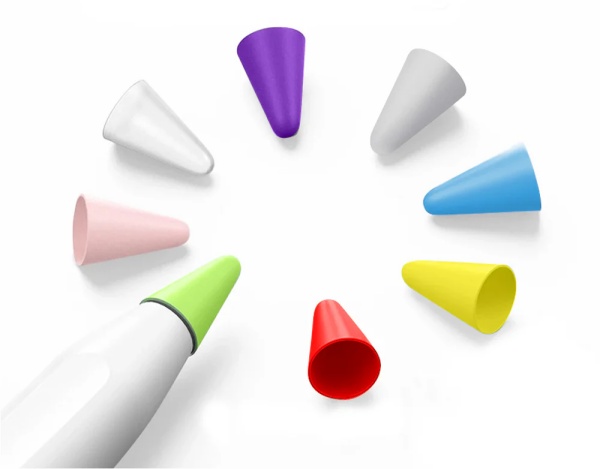
Tip covers, especially silicone ones, add a soft “paper-like” resistance that feels comfortable. One silicone cover on Amazon claims it “improves handwriting feeling” and increases friction to reduce slipping.
-
Noise reduction
I hate hearing that “tap tap” when taking notes. Many users say tip covers almost eliminate tapping sounds and feel quieter while writing .
-
Protects the original nib
A Redditer pointed out that using a silicone tip cover can extend the life of the Apple Pencil tip, particularly when paired with a matte screen protector.
-
Affordable and easy to replace
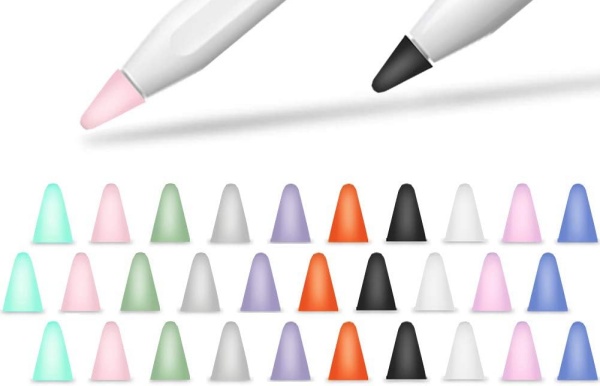
Affordable brands (like TechMatte at around $9 for an 8-pack) are criticized for durability but praised for value.

Cons
-
Precision loss
Extra bulk from the cover can affect fine lines. One Reddit user said it “lacks the point precision I wanted,” and reviewers on Amazon noted it can make detailed drawing tricky.
-
Durability issues
Many covers wear out within a few weeks and may fall off. Some BestBuy reviews mention fragility after 30 days .
-
Screen sensitivity trade-offs
A slight reduction in screen responsiveness has been reported by users who need a firmer touch.
In my own experience, the cover offered a nice matte feel when writing casually, but I did lose control during precise line work. I used it for note-taking and journaling, and it worked well there. But when sketching or detailing, I removed it for better precision.
Should You Use an Apple Pencil Tip Cover?
It depends on your use:
-
If you mostly take notes or journal, and dislike the slippery glass feel, a tip cover can be a simple and inexpensive upgrade.
-
If you draw, sketch, or do fine art, you might find the loss of precision too limiting—and abrasive matte covers may wear quickly.
-
Combine a matte screen protector with a tip cover only if you’re okay with faster nib wear—it speeds up tip deterioration.

Is It Worth Using an Apple Pencil Nib Cover?
For me, yes – for casual writing and convenience. I got quieter, smoother strokes and saved wear on the nib. But the trade-off in fine control and durability was noticeable. For artists or heavy detail use, the original nib or a high-quality metal/plastic alternative tip is better.
Best Tip Covers for Apple Pencil 1 & 2
Top picks I found:
-
TechMatte Silicone Tip Cover (8-pack) – great grip, quiet writing, affordable. Some users reported early wear.
-
SaharaCase Nib Covers – praised for feel and color, but some noted less screen sensitivity.
-
IFELI Silicone Covers – add friction and fit both Apple Pencil 1 & 2.
I personally chose TechMatte for everyday writing. It lasted about 3–4 weeks before needing replacement.
Q&A
Q: Do tip covers affect Apple Pencil performance?
A: Yes – by adding friction and slight bulk. You’ll feel less tap noise and more grip, but you may lose some precision.
Q: How long do covers usually last?
A: Anywhere from 2-6 weeks. Some users report they wear quickly, others use them longer. Replacements are cheap.
Q: Should I use a tip cover with a matte screen protector?
A: It’s an option, but note that matte protectors accelerate nib wear. The combo increases resistance—which may wear tips sooner .
Q: Is it better to replace the nib instead?
A: For artists or detail work, yes. Metal or high-quality plastic nib replacements give better precision and durability.
Final Thoughts
The pros and cons of using Apple Pencil tip covers are clear: they’re a cheap and easy way to get better grip and less noise when taking notes, but they come with trade-offs in precision and life-span. Ask yourself:
-
Do you value a quieter, paper-like feel?
-
Or do you need ultra-precise control for art and design?
If it’s the former, definitely give it a try. Stick with a reputable brand like TechMatte or SaharaCase and keep some extras on hand. But if precision matters more, stick with the original nib or invest in high-quality replacements.
Thanks for reading!
Read More: How To Fix A Bent iPad: What I Learned From My Own iPad Slightly Bent