

Deciding between Notability vs Goodnotes 6? Here is an honest, practical comparison of pricing, AI features, and real-world handwriting performance.
If you own an iPad and an Apple Pencil, you’ve likely faced the classic digital note-taking dilemma. For years, two giants have dominated the App Store, continuously pushing the boundaries of what our tablets can do.
Choosing between them used to be simple: one relied on continuous scrolling, while the other focused on a realistic notebook experience. However, with massive AI updates, new pricing models, and cross-platform expansions, the choice requires a deeper look.
Let’s break down the real-world differences between these two powerhouses to find out which one deserves a permanent spot on your iPad dock.
CONTENTS:
Notability vs Goodnotes 6: The ultimate digital note-taking showdown
To truly understand how these apps fit into your daily workflow, we need to look past the marketing checklists and focus on how they feel during actual use. Whether you are tracking a rapid-fire lecture or organizing a messy brainstorming session, the layout and design choices of each app will fundamentally shape how you think and create.
Interface and organization: Subjects vs notebooks
The way you organize your thoughts says a lot about how your brain works. Both apps handle digital file storage beautifully, but their visual frameworks are completely different.
-
Notability uses a streamlined, minimalist subject and divider system. Think of it like a filing cabinet: you open a sidebar, click on a category, and scroll through an endless vertical list of notes. It is fast, keeps layout settings minimal, and is designed to get you writing within two seconds of launching the app.
-
Goodnotes 6 embraces a traditional digital notebook architecture. You create individual notebooks with customizable covers, categorize them into nested folders, and turn pages horizontally (though vertical scrolling is available). It feels highly structured, visual, and tactile—ideal if you love the physical aesthetic of standard paper binders.
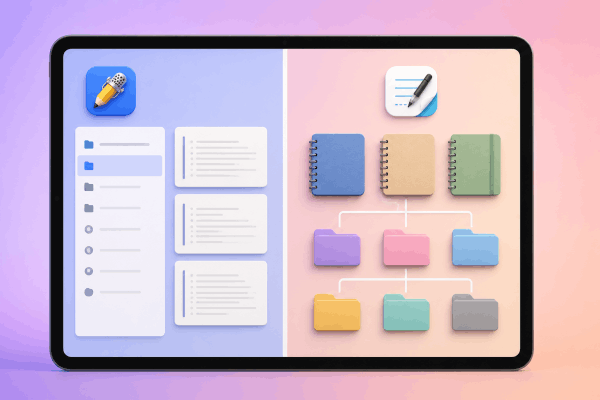
If you prefer a clean workspace where files stay tucked away out of sight, Notability is incredibly efficient. If you are a visual thinker who needs to color-coordinate folder icons and separate projects into distinct books, Goodnotes 6 provides a much more satisfying setup.
The handwriting experience and toolsets
When your Apple Pencil meets the iPad screen, responsiveness and precision are non-negotiable. Both apps offer exceptional palm rejection and low ink latency (lag), but their core drawing engines cater to different handwriting styles.
| Feature | Notability | Goodnotes 6 |
| Pen choices | Ballpoint, Fountain, Pencil | Ballpoint, Fountain, Brush |
| Canvas style | Infinite vertical scrolling | Page-by-page or infinite whiteboard |
| Erasing style | Standard stroke/pixel erase | Pixel erase + Scribble to erase gesture |
| Selection tool | Single-page lasso | Cross-page lasso + Circle to lasso gesture |
Goodnotes 6 leans heavily into stroke customization, allowing you to fine-tune your pressure sensitivity and stabilization to make your messy handwriting look polished. It also features incredibly useful smart gestures:
-
Scribble to erase: Simply scratch out a mistake with your pen, and it vanishes.
-
Circle to lasso: Draw a circle around text and tap it to instantly move it across your page or even between different pages.
Notability counters with a highly requested addition: a dedicated pencil tool featuring realistic tilt shading. This makes it a fantastic option for anyone who likes to sketch out diagrams, mind maps, or structural layouts alongside their text. However, its selection lasso tool is strictly limited to the active page you are writing on.
Audio recording and AI note assistants
Artificial intelligence has completely transformed modern note-taking. Instead of simply storing your handwriting, these apps now actively help you study, summarize, and process information.
The primary divide: Goodnotes 6 focuses on building and polishing content, while Notability focuses on comprehension and active learning.
Notability remains the industry gold standard for real-time audio transcription. When you record a live presentation or meeting, it transcribes the speech into text and syncs it directly to your handwriting. When you play the audio back, your written notes light up like karaoke lyrics exactly when they were recorded. Furthermore, its advanced AI tiers can automatically generate structured study summaries, practice flashcards, and interactive quizzes directly from your recorded audio and written text.

Goodnotes 6 approaches AI from a composition standpoint. It integrates closely with language models like Claude to help you auto-complete sentences, fix spelling errors in your own handwriting, and adjust the tone of typed text. It also features a robust AI Math Assistance tool that catches calculation errors in your formulas and helps walk you through complex equations step by step.
Pricing and cross-platform availability
The pricing structures for both apps have evolved into multi-tiered ecosystems that can easily confuse buyers. Here is a clear look at what you will actually pay:
Goodnotes 6 pricing
-
Free tier: Limited to 3 notebooks with a 5MB import limit and basic AI features.
-
Essential ($11.99/year): Unlocks unlimited notebooks and standard AI tools for Apple ecosystem users.
-
Pro ($35.99/year): Grants full cloud transcription, Google Drive/Calendar integrations, and cross-platform synchronization across iOS, macOS, Android, Windows, and Web.
-
Special Edition ($35.99 one-time purchase): A perpetual license exclusive to Apple devices, though it lacks advanced cloud AI tools and cross-platform sync.
Notability pricing
-
Starter ($0): Provides basic note editing with a monthly usage cap, but allows unlimited note editing via their web browser portal.
-
Plus ($19.99/year): Removes editing limits, includes handwriting search, and provides post-recording audio transcription alongside 400 AI quizzes per month.
-
Pro ($99.99/year): Designed for enterprise users, offering real-time live transcription, an AI-powered notes chat assistant, and unlimited automated study tools.
If you hate recurring subscription fees, Goodnotes 6’s one-time purchase tier provides massive long-term value. However, if you are a student operating purely within the Apple ecosystem who relies heavily on lecture recordings, Notability Plus offers a highly competitive entry point.
Practical tips for real-world note-taking
Features look great on a spec sheet, but everyday productivity requires practical strategies. Experienced digital note-takers rely on these field-tested methods to get the most out of their setups:
-
Beat the glass screen friction: Writing directly on iPad glass can feel slippery and unnatural. If you want a paper-like feel that gives you better handwriting control, pair your preferred app with a matte, textured screen protector.
-
Master the split-screen workflow: Do not try to pack everything onto a single view. Open your digital textbook or a lecture slide on the left half of your iPad screen, and open your note-taking app on the right. Both apps support seamless drag-and-drop actions for images and text snippets.
-
Protect your storage with backup rules: Cloud syncing issues can happen to anyone. Go into your app’s settings panel right away and enable automatic backup to a secondary cloud provider (like Google Drive, OneDrive, or Dropbox) as a PDF copy. If your primary iCloud sync ever glitches before an exam or a major meeting, you will still have instant access to your notes.
Discover More:
- GoodNotes import PDF not working? Here’s how to fix it step by step
- How to recover deleted notes in GoodNotes: Everything you can try
Frequently asked questions about Notability vs Goodnotes 6
Can I use Goodnotes 6 or Notability without an internet connection?
Yes. Both apps store your notebooks locally on your iPad, allowing you to read, write, and edit entirely offline. Your changes will automatically sync to your other devices once you reconnect to Wi-Fi or cellular data.
Which app is better for importing and filling out large PDFs?
While both handle PDF annotation smoothly, Goodnotes 6 is generally superior for large text documents, imported digital planners, and hyperlinked diaries. Its notebook layout lets you flip through pages quickly, and its search engine indexes typed text inside PDFs with extreme speed.
Can I convert my handwritten notes into typed text?
Yes, both applications feature built-in handwriting-to-text conversion tools. However, Goodnotes 6 includes this feature across its standard paid tiers, whereas Notability packages advanced handwriting search and text conversion behind its subscription tiers.

Final thoughts
Ultimately, your choice down to how you process information.
Goodnotes 6 is built for the visual organizer. If you want total control over your folder structures, love utilizing aesthetic digital planning templates, or want the financial peace of mind that comes with a one-time purchase option, it is an incredible tool.
Notability is built for the active listener. If your priority is showing up to a meeting or class, hitting record, and letting an AI assistant help you transcribe, summarize, and quiz you on spoken information later, Notability’s layout is unmatched.
Consider your daily workflow, download the free trials for both, and choose the app that complements the way you naturally think.