

Paperlike vs glass screen protector? Discover the practical differences in drawing feel, screen clarity, and apple pencil tip wear to choose the best one.
As someone who spends hours every single day tucked into the Apple ecosystem, I know firsthand that unboxing a new iPad is pure bliss. The flawless, liquid-clear display is a work of art by itself. But the second you press the plastic tip of your Apple Pencil against that slick glass, the illusion breaks. It feels less like sketching in a premium notebook and more like ice skating on a kitchen window.
This brings every digital artist, student, and casual note-taker to a classic tech fork in the road: should you buy a textured matte film or stick to classic tempered glass?
If you are stuck choosing between a Paperlike vs glass screen protector, you are not alone. It is one of the most hotly debated topics in tech communities. Let’s strip away the marketing fluff and look at how these two options handle everyday writing, drawing, durability, and screen clarity so you can find the perfect fit for your workflow.
CONTENTS:
Paperlike vs glass screen protector: What is the real difference?
The fundamental difference comes down to raw materials and design intent.
-
Tempered glass screen protectors are designed to be a sacrificial armor layer for your tablet. They mimic the iPad’s native glossy glass screen, prioritizing high impact protection, absolute clarity, and a slick, frictionless glide.
-
Paperlike and matte screen protectors are thin, textured plastic films. They are engineered to introduce intentional friction, simulating the microscopic “tooth” of physical paper, to give you more control when using a stylus.

Choosing between them forces you to balance tactical feedback against visual perfection. Let’s break down exactly how they compare in the real world.
1. The drawing and writing experience
If your primary goal is to take neat lecture notes or render smooth line work in Procreate, surface texture changes everything.
-
The matte paper-feel experience: Writing on a matte film slows down your stylus just enough to prevent your hand from slipping. It eliminates that awkward “tapping” click-clack sound, replacing it with a soft, satisfying whisper. Your handwriting instantly becomes more precise because your muscle memory has micro-resistance to lean into.
-
The tempered glass experience: Glass is incredibly fast. If you are drawing slow, deliberate diagonal lines, the thickness of tempered glass can sometimes cause minor “line wobble” in creative apps. However, if you are a graphic designer who works mostly with vector paths, or a casual user who navigates primarily with finger gestures, the silky smoothness of glass feels much more premium and responsive.
2. Screen clarity and color accuracy
Here is where the paper-texture crowd has to make a compromise.
The Golden Rule of Matte Screens: You cannot add texture to a screen protector without affecting the light passing through it.
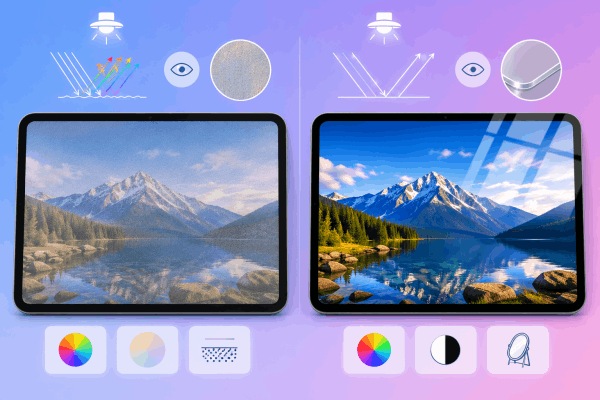
Matte films use microscopic beads to scatter light. While this is an absolute lifesaver for diffusing overhead glare and reflections, it acts like a tiny prism. It introduces a faint, rainbow-like grain (often called “noise”) over your display. White backgrounds will look slightly fuzzy, and vibrant colors lose a fraction of their punch. If you bought an iPad Pro specifically to watch 4K HDR movies or color-correct professional photography, a matte film will degrade that gorgeous screen real estate.
Tempered glass, on the other hand, preserves 99.9% of your screen’s original contrast, deep blacks, and vivid colors. The trade-off? It turns your iPad into a mirror under bright lights.
3. Apple Pencil tip wear and durability
A common worry among new tablet users is whether a textured film will aggressively grind down their hardware.
The short answer: Yes, but it is manageable. Because matte protectors act like very fine sandpaper, they do accelerate pencil tip wear. If you draw or write heavily for hours a day, expect to replace your plastic Apple Pencil nib every four to six months. Fortunately, replacement tips are inexpensive and twist on in seconds.
Tempered glass causes virtually zero wear on your stylus. However, glass protectors are brittle; they can chip at the edges or crack if bumped inside a cramped backpack. A high-quality matte plastic film will never shatter, though it will accumulate fine surface scratches over a year of heavy use.
You may need this: I Tried Paperlike On My iPad – Here’s What I Think
If you feel completely torn down the middle, the tech industry has quietly engineered a brilliant middle ground: magnetic removable matte screen protectors.
Brands like ESR and Astropad make textured overlays that attach to your iPad’s bezels using thin magnetic strips. This allows you to have the best of both worlds:
-
Keep a permanent, crystal-clear tempered glass protector on your iPad for daily defense.
-
Snap the magnetic paper-feel sheet over the top when it’s time to study, take notes, or sketch.
-
Peel it off and pop it into its sleeve when you want to stream movies or edit photos with pristine color accuracy.

Just keep in mind that stacking two protectors can slightly reduce touch sensitivity, and cheap magnetic options can sometimes slide around if you press down with a heavy hand.
Comparison table: Quick look at the trade-offs
| Feature | Paper-Feel Matte Film | Tempered Glass Protector |
| Primary Material | PET Plastic | Tempered Glass |
| Texture Feel | Grainy, toothy, paper-like | Smooth, slick, glossy |
| Scratch & Drop Protection | Low impact defense; shields scratches | High impact defense; absorbs shock |
| Display Clarity | Muted colors, slight graininess | 100% crystal clear, high contrast |
| Anti-Glare Properties | Excellent (diffuses light) | Poor (highly reflective) |
| Stylus Wear | Wears down plastic nibs over time | No noticeable wear on nibs |
Which one should you buy?
To make your final decision simple, match the protector to your dominant daily use case:
-
Buy a paper-feel matte protector if: You are a student, digital illustrator, or journalist who uses the Apple Pencil for more than 70% of your tablet time. The ergonomic comfort and line control completely outweigh the slight loss in screen vividness.
-
Buy a tempered glass protector if: Your iPad is an entertainment and media machine first. If you mostly browse the web, watch movies, play games, and edit video – only using the pencil to occasionally sign PDFs or jot casual notes – glass keeps your screen beautiful and safe.

Frequently asked questions about Paperlike vs glass screen protector
Do paper-like screen protectors ruin the Apple Pencil?
They do not ruin the internal mechanics of the pencil, but they do wear down the replaceable plastic tip due to surface friction. If you want to prevent this, you can buy alternative fine-point metal pencil tips that mimic a ballpoint pen and do not wear down on matte surfaces.
Can you put a Paperlike protector over tempered glass?
You can apply a traditional adhesive matte film over glass, but it is not recommended because the combined thickness can cause your iPad to miss touch inputs or create massive line distortion when drawing. If you want to combine both, buy a specialized magnetic removable matte protector instead.
Is a matte glass screen protector a good alternative?
Yes, some manufacturers make “etched matte glass” protectors. They offer better drop protection than plastic films and don’t reduce screen clarity quite as much, but they are generally smoother and offer less paper-like traction than a dedicated matte film.
Read More: