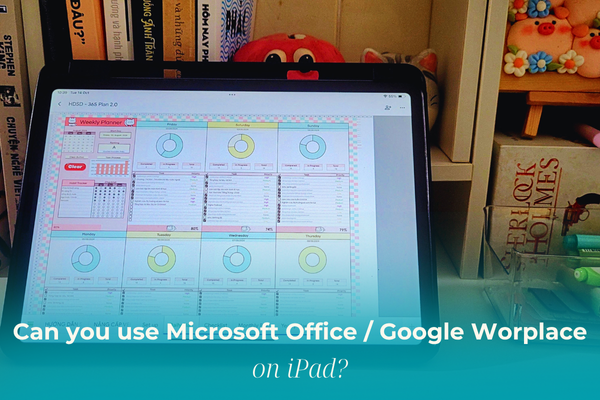

Can you use Word on iPad? Learn how to use Word, Excel, Google Docs, Sheets on iPad, their pros and limits, and if an iPad can replace a laptop.
Every time you think about buying an iPad, a bunch of questions start popping up in your head, and I totally gets that feeling.
Before getting my iPad Pro 2020, I spent weeks wondering:
“Can an iPad really replace my laptop?”
“Can it handle Word, Excel, or Google Docs properly?”
Let’s find out together in this guide!
CONTENTS:
Can you use Word, Excel, PowerPoint,… on iPad?
For students and office workers, Microsoft Office apps are essential.
The good news is that Microsoft fully supports Word, Excel, and PowerPoint on iPad through the Microsoft Office app (or each app individually) available on the App Store.

Here’s how to use them:
-
Go to App Store =? search Microsoft Word, Excel, or Office.
-
Download and log in with your Microsoft account (Outlook or Gmail works fine).
-
Start creating, editing, and saving files just like on your laptop.
However, even though these apps work smoothly, the experience is not exactly the same as on a computer.
-
Some advanced features (macros, add-ins, complex charts, advanced Excel formulas) are not supported.
-
You’ll need a Microsoft 365 subscription to unlock full editing features.
So yes, you can absolutely use Word, Excel, and PowerPoint on iPad, but only for basic tasks. It’s not a full PC replacement yet.
What about Google Docs, Sheets, and Slides?
If you prefer free tools, Google’s suite is a great alternative. Google Docs, Sheets, and Slides work perfectly on iPad via their official apps.
You can:
-
Open files directly from Google Drive.
-
Work offline, then sync automatically once you’re back online.
-
Collaborate, share, and comment in real-time.

But again, there are limitations:
-
Some desktop features are missing or simplified.
-
The touch interface can make editing formulas or adjusting layouts slower than on a laptop.
In short: Google Docs and Word perform quite well on iPad, but Excel and Sheets are still less comfortable for data-heavy tasks. If you often work with spreadsheets, you’ll definitely want a proper laptop or PC.
Can an iPad replace a laptop?
A common question! As iPads get stronger and iPadOS more capable, many wonder if they can finally ditch their laptop.
But my answer is still NO, even though iPads have improved a lot.

Yes, iPads are portable, work beautifully with the Apple Pencil, and feel almost like a laptop when paired with a keyboard and mouse. But there are still major differences:
-
iPadOS ≠ macOS or Windows => you can’t install full software like Photoshop, SPSS, or Premiere Pro.
-
Multitasking has improved but remains limited compared to a real computer.
-
File management is more restrictive, still tied to iCloud or Google Drive.
-
Office apps only offer basic functionality; editing feels less fluid than on a laptop.
In short: iPads are perfect for studying, taking notes, sketching, or light work. But they’re not ready to replace a full laptop if your tasks are complex or require advanced tools.
Related Reads:
Q&A: Common Questions About iPad Office Apps
1. Do I need a keyboard or mouse to use Word on iPad?
Not necessarily. You can type directly on the touchscreen, but using a keyboard makes long writing sessions easier and faster. A mouse or trackpad also helps with precise cursor control.
2. Can I use Microsoft Office for free on iPad?
Yes. You can view, create, and edit basic documents for free.
However, premium features (formatting, collaboration tools, cloud sync) require a Microsoft 365 subscription.
3. Which is better on iPad: Microsoft Office or Google Workspace?
If you often collaborate online => Google Docs / Sheets feel smoother.
If you need offline access and formatting precision => Word / Excel still win.
4. Which iPad works best for Word, Docs, Excel,…?
All iPads can handle these apps, but for smoother multitasking, choose:
-
iPad Air (M1 or M2).
-
iPad Pro (M1/M2/M4) – faster chip + larger screen = better workspace.

5. Can I write in Google Docs on iPad?
Yes, absolutely! You can write, edit, and collaborate in Google Docs directly on your iPad using the Google Docs app from the App Store.
It supports typing, text formatting, comments, and even real-time collaboration – just like on desktop.
If you connect a keyboard (or use Apple Pencil for Scribble), it becomes an even smoother writing experience.
6. Can an iPad read Word docs?
Yes. Your iPad can open and read Word documents easily.
You can use the Microsoft Word app, the Files app, or even Google Docs to open .doc and .docx files.
If someone sends you a Word file via email or Messenger, just tap on it, iPadOS will automatically preview or suggest the right app to open it.

Final Thoughts
So, can you use Word, Excel, Google Docs, and Sheets on iPad?
Yes – but with limits.
Even with accessories like a keyboard, mouse, or Apple Pencil, the iPad still can’t replace a full computer.
And my advice? Buy a laptop first, unless your main focus is drawing, writing notes, or studying on the go. If you already have a laptop, then yes. go ahead and enjoy the iPad life.