
Apple Pencil not charging? Discover easy fixes, from pairing to warming up, so you can get back to drawing fast.
Ever had that panic moment when you grab your Apple Pencil and nothing happens? It feels like you’ve lost a limb for art. You’re not alone. Sometimes my Apple Pencil wouldn’t charge, and I felt like my creativity was stuck too. Good news: it’s usually fixable.
Before we dive in, let me say: stay calm. Don’t trash your Pencil just yet. In this post, I’ll walk through tried-and-true methods I gathered from Reddit, forums, YouTube, and my own trials. You’ll likely be sketching again soon.

CONTENTS:
What to Do When Your Apple Pencil Not Charging
When your Apple Pencil stops charging, you should try some easy tips below:
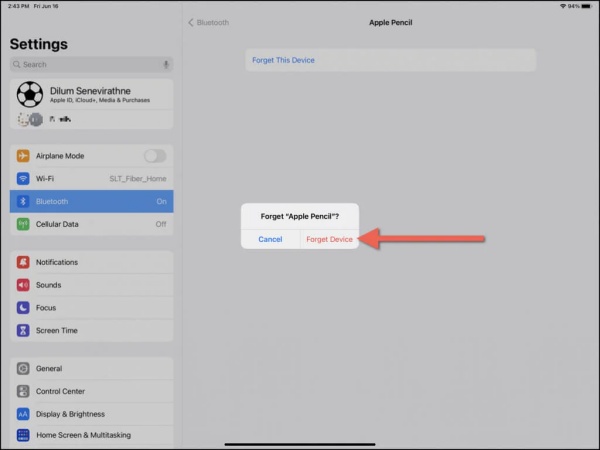
1. Forget and re-pair Bluetooth
One of the simplest fixes – unpair and re-pair the Pencil to your iPad’s Bluetooth. That’s actually how I fixed my Apple Pencil when it wouldn’t charge.
On Apple’s forums, a user shared:
“Go to Bluetooth settings => info button next to the pencil => Forget device => Pair again… Your pencil will show as charging/charged again.”
Reddit users confirm this often works. Someone said for their 2nd‑gen Pencil:
“Disconnect it in Bluetooth then connect it again. That has always fixed it for me (the charge % not being accurate).”
Step-by-step:
-
Settings=> Bluetooth.
-
Tap “i” next to Apple Pencil => Forget This Device.
-
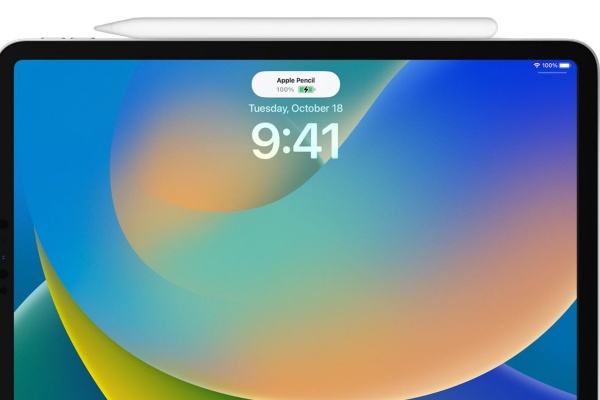
Magnetically attach your Pencil (2nd gen) or plug it in (1st gen).
-
Tap Pair. Works like charm.
2. Hard‑reset the iPad
If re-pairing didn’t cut it, try a proper power-cycle/reset.
One Redditor shared a success story:
“I attached my pencil… it still showed 0%. I did a hard reset on the iPad, and when it rebooted, the pencil was 100%.”
To force restart:
-
For iPads without Home button: press Volume Up, then Volume Down, then hold Power until Apple logo appears.
-
On older iPads: hold Home and Power together.
Often this “wakes up” charging logic.
3. Warm up the Pencil
Strange but effective.
Several Reddit threads mention this odd hack: warming the Pencil unlocks charging.
One user said wrapping it under a towel with a hot bottle revived theirs. Another microwaved a heating pad, then held the Pencil inside for 15–20 minutes, and it charged again.
It seems heating revives the internal battery’s chemistry. Try holding it in your palm or under a warm cloth for a few minutes before charging.
4. Charge it regularly (don’t leave dead!)
Apple’s tiny Li‑ion battery hates being left at 0% for too long.
On Apple forums:
“If your Pencil was left drained for an extended period…the battery may have failed…You need to keep your Pencil CONSTANTLY charged to a minimum of 5‑10%.”
Reddit confirms: old stock pencils that sat too long sometimes arrive with dead batteries.
So keep it attached, or charge briefly every week, even a few seconds gives 30 minutes of life.

5. Check hardware & nib
If none of the above works, check for basic hardware issues:
-
Attachment: For Pencil 2, ensure it’s seated flush and magnets snap it correctly.
-
Tip tightness: A loose nib can disrupt charging .
-
Replacing tip or adapter: For Pencil 1, occasionally the Lightning adapter or cable fails.
6. Warranty or replacement?
If your Pencil is truly dead (no charging even after fixes), it might need replacement.
Reddit users often say:
“Big‑Accountant78: brand new pencil shows 0% – reason is battery lost ability to hold charge. Only solution: return or get a free replacement under warranty.”
Consumer boards agree: batteries deteriorate irreversibly. If it’s still under warranty, swap it at the Apple Store . Out of warranty? It might be time for a new one or battery service.
Don’t miss this:
- Apple Pencil Not Working on Procreate: Some Quick Solutions
- Apple Pencil Battery Not Showing: How to Fix Missing Battery Percentage
Q&A Section About Apple Pencil Not Charging
Q: How long does it take to charge my Apple Pencil?
About 15 seconds gives 30 minutes of use, and a full charge lasts ~12 hours.
Q: What’s the difference between gen‑1 and gen‑2 charging?
-
Gen‑1 plugs into Lightning or uses adapter.
-
Gen‑2 charges wirelessly by magnetically attaching to compatible iPads .
Q: Charging shows 0%, but actually works?
Yes, iPad sometimes misreports battery. After forgetting device, re-pairing, or warm-up, battery jumps from 0 to 100 unexpectedly .
Q: My Pencil died permanently, what now?
If all else fails and it’s out of warranty, replacement is likely, but if it’s within a year, Apple support should provide a free unit.
Final thoughts
I know that sinking feeling when your Pencil stops charging, especially mid-sketch. But most cases aren’t Diablo-level cursed, they’re fixable with simple steps:
-
Unpair + re‑pair Bluetooth.
-
Do a proper iPad hard‑reset.
-
Warm it up.
-
Keep it charged (don’t let it hit 0%).
-
Check hardware connections.
-
Use warranty if needed.
This routine rescued my Pencil, and I’ve seen dozens of folks revive theirs over and over. Keep these tricks handy. You’ll save money, stress, and precious creation time.
Wrap your Pencil in a cozy and keep dreaming, your next masterpiece awaits!